A spreadsheet smoother than Excel.
With the power
of a database.
Keep your Excel habits, only simpler and faster. And behind every table, a real SQLite database unlocks what Excel cannot do: SQL queries, instant pivot tables, connections to your databases, live teamwork, Lua scripts. Free, for everyone.
Free beta for Windows, macOS and Linux · Other systems
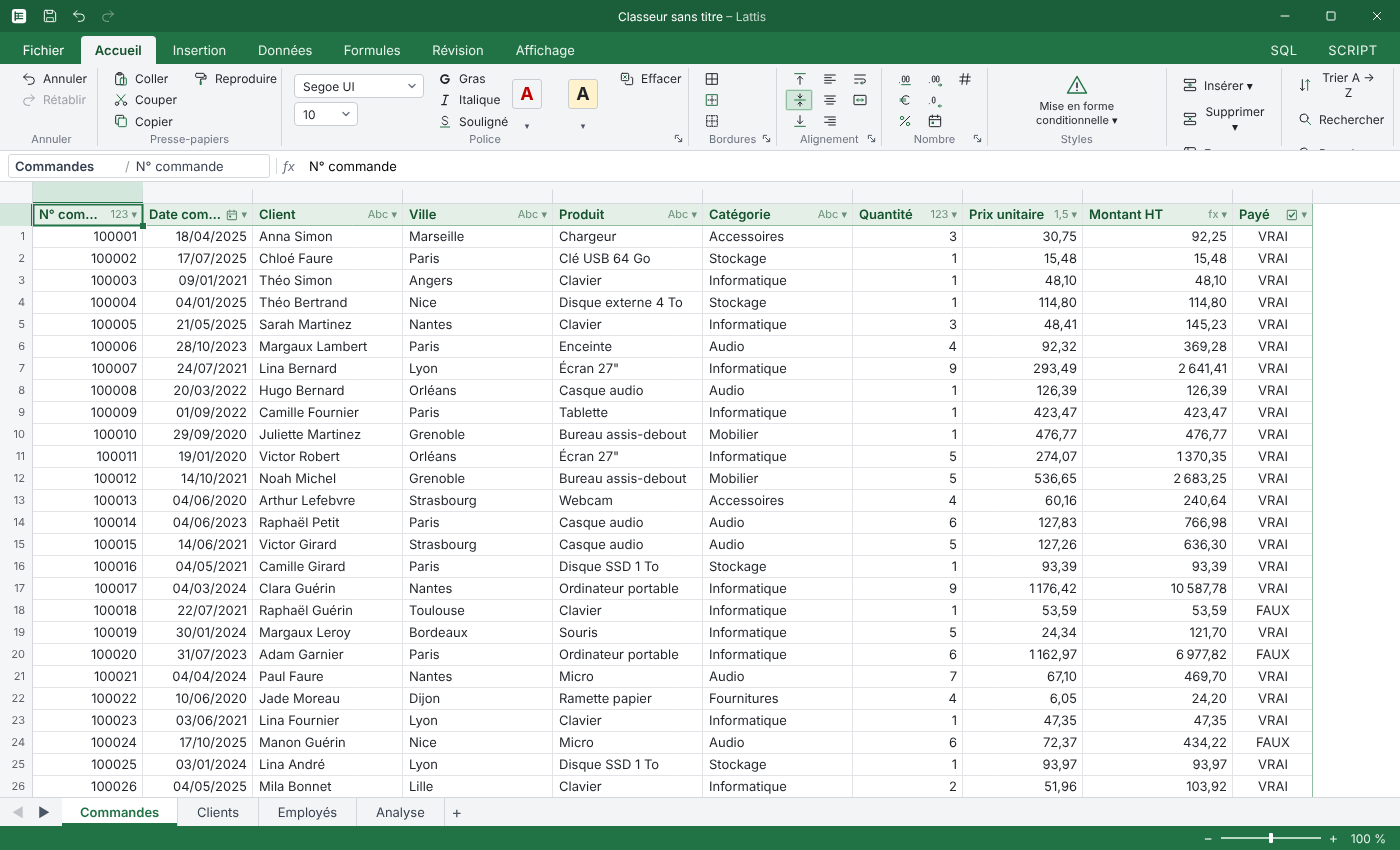
GROUP BY in one clickHow it works
A spreadsheet that understands your data
No schema to draw, no wizard to follow. Lattis watches what you type and does the database work for you.
| Code | Name | City |
| C01 | Martin | Lyon |
| C02 | Dubois | Paris |
| C03 | Bernard | Lyon |
Type freely
Enter your data anywhere on the canvas, like in any spreadsheet. Nothing gets in the way of your typing.
| Code 🔑 | Name Abc | City Abc |
|---|---|---|
| C01 | Martin | Lyon |
| C02 | Dubois | Paris |
| C03 | Bernard | Lyon |
Lattis detects the table
It spots the block of data, highlights the header, infers each column's type and creates the matching SQLite table.
SELECT City, COUNT(*)
FROM Customers
GROUP BY City;
| City | n |
|---|---|
| Lyon | 2 |
| Paris | 1 |
Query and analyze
Your tables are real tables: SQL, formulas, pivot tables and charts run directly on the engine.
Ease of use
Simpler and smoother than Excel
The same gestures, fewer steps. Lattis takes care of what Excel leaves you to do by hand.
=VLOOKUP(A2,Customers!A:D,3,FALSE)=REFERENCE(Customers, City, A2), readable, no column numberDemo
See Lattis in action
Short videos covering the essentials. They are coming with the first public releases.
Features
Everything Excel doesn't do
Every table is a real SQLite table. You keep the grid, and you gain everything a database makes possible.
Infinite canvas
Several independent tables per sheet, each framed by a thin border. If one starts in A1, the sheet tab takes its name.
Typed columns
Text, integer, decimal, date, boolean. The type is detected as you type, never blocks your input, and can always be changed.
Local-first
Everything fits in a single .lattis file, easy to send or archive, with crash recovery built in.
Familiar formulas
An Excel-like language with structured references such as Customers[City]. VLOOKUP becomes REFERENCE.
SQL tab
Query and edit your tables in SQL, with every object in the workbook listed right beside you.
Lua scripts
Automate with db.query() and events. A safeguard stops infinite loops, so the interface never freezes.
Pivot tables
Instant aggregations thanks to the engine's native GROUP BY, displayed as a tree.
Charts and documents
Charts fed by your data, and Document tabs to lay out your analyses.
AI assistant, if you want it
An Assistant tab that is off by default, which you can connect to your own key or account.
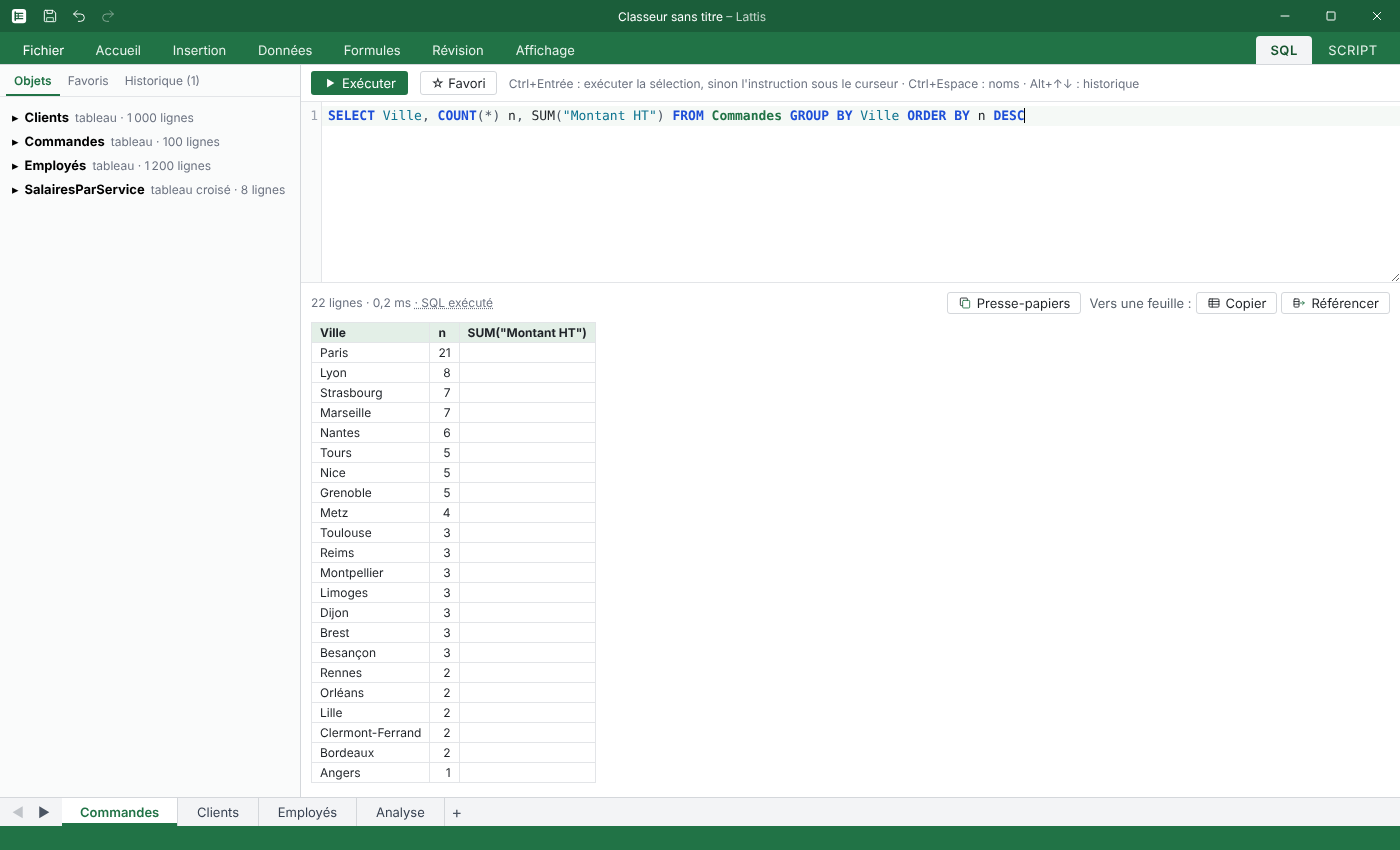
SQL
SQL and grid, side by side
Run a GROUP BY in the SQL tab and the result appears as a grid you can sort, filter and reuse.
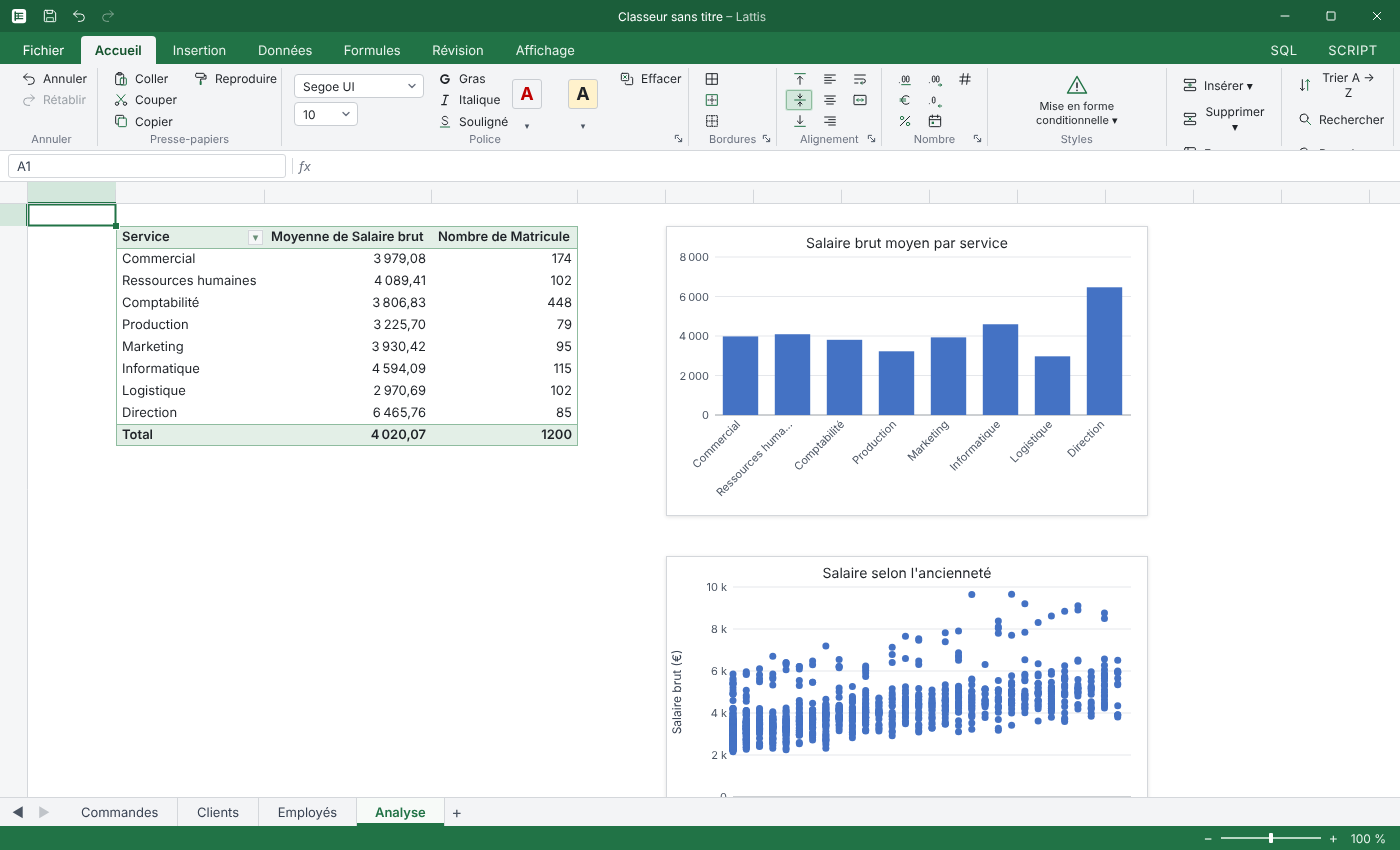
Analysis
Analysis without lag
Pivot tables and charts rely on SQLite's native aggregation. They update as soon as your data changes.
Lua
Automate with Lua
A simple, safe API to work on your tables in the background, with a built-in reference and warnings as you type.
for row in db.rows("SELECT _id, Prix FROM Produits") do
  db.update("Produits", row._id, { Prix = row.Prix * 1.03 })
end
Connections
Connected to your databases and your team
Import and refresh external data, Power Query style. Passwords stay in your computer's keychain.
Relational databases
PostgreSQL, MySQL and MariaDB, SQL Server, SQLite.
APIs and files
JSON REST APIs, Parquet and JSON files.
Teamwork
Lattis Server, self-hosted on PostgreSQL: live multi-user editing, roles and permissions, offline work, a Data Lake and editing from the browser. A workbook can also be shared on a network folder or a NAS.
Pricing
Free. For everyone.
No Pro edition, no subscription, no row limit. Lattis is free for individuals and companies alike, and it will stay that way.
Lattis
€0
forever
- Every feature, no crippled edition
- Personal and commercial use
- No account required
- Your data stays on your machine
- Updates included
So who funds Lattis?
The software is free for everyone because those who get the most value from it contribute in other ways.
Company donations
Companies that rely on Lattis every day can support its development with a donation.
Partnerships and sponsors
Partners fund specific features or back the roadmap, in full transparency.
Training
Courses to get started with Lattis, SQL or Lua automation, for teams or individuals.
Business support
Help with rollout, migration from Excel, connecting your databases and custom scripts.
Download
Install Lattis
The button automatically picks the right installer for your system from the latest release.
Lattis is in beta and may still have bugs. Keep a copy of your important files and report problems on GitHub.
Looking for the latest release…
Windows
.exe installer
Portable version: just the executable, no installation, for example on a USB stick. .lattis files won't open on double-click and no Start menu shortcut is added. Requires WebView2, included with Windows 11 and up-to-date Windows 10.
The installers are not signed yet. If SmartScreen shows “Windows protected your PC”, click “More info” and then “Run anyway”.
macOS
DMG disk image
If macOS refuses to open the app the first time, go to System Settings, Privacy & Security, and click “Open Anyway”.
Linux
AppImage, .deb and .rpm packages
Frequently asked questions
Is Lattis really free?
Yes. Every feature is free, for personal and professional use, with no subscription and no Pro edition. The project is funded by company donations, partnerships, training and business support.
Where is my data stored?
On your computer. A workbook is a .lattis file containing a SQLite database. Nothing goes to a server unless you connect an external database or your own Lattis Server yourself.
Will my Excel habits still work?
Yes: ribbon, context menus, shortcuts, undo and redo, familiar formulas. VLOOKUP is even converted to REFERENCE automatically.
Which systems does Lattis run on?
Windows, macOS and Linux. It is a native application built in Go with Wails and SvelteKit, without the weight of Electron.
When can I try it?
Right now: a first beta is available for Windows, macOS and Linux. The Download button automatically fetches the latest version for your system.
Can my company help?
Gladly: through a donation, a partnership, training for your teams or tailored support. Write to us at contact@lattis.be.

Ready for a smoother, more powerful spreadsheet?
Try the beta and tell us what you think on GitHub.
Architecture
Under the hood
For the curious: a native application, a real database inside every file, and a self-hosted server when you work as a team.
Native application
Written in Go with a SvelteKit interface, brought together by Wails. A real application for Windows, macOS and Linux, light and fast, without Electron.
A database in every file
Every .lattis file holds its own SQLite database. Nothing else to install, and your data stays with the file.
Formulas and scripts
Calculations run on the SQL engine. Lua scripts run without ever freezing the interface.
Assistants and MCP
A built-in MCP server lets an assistant such as Claude work on the open workbook, if you turn it on.
Lattis Server
For teamwork, a server you host yourself. PostgreSQL 18 is required; Docker or Kubernetes are supported. Editing from the browser too.
Offline and NAS
Work carries on without a network and syncs when the connection returns. Without a server, a plain shared folder or NAS is enough to work together.